构建一个基于时间轴的视频编辑器
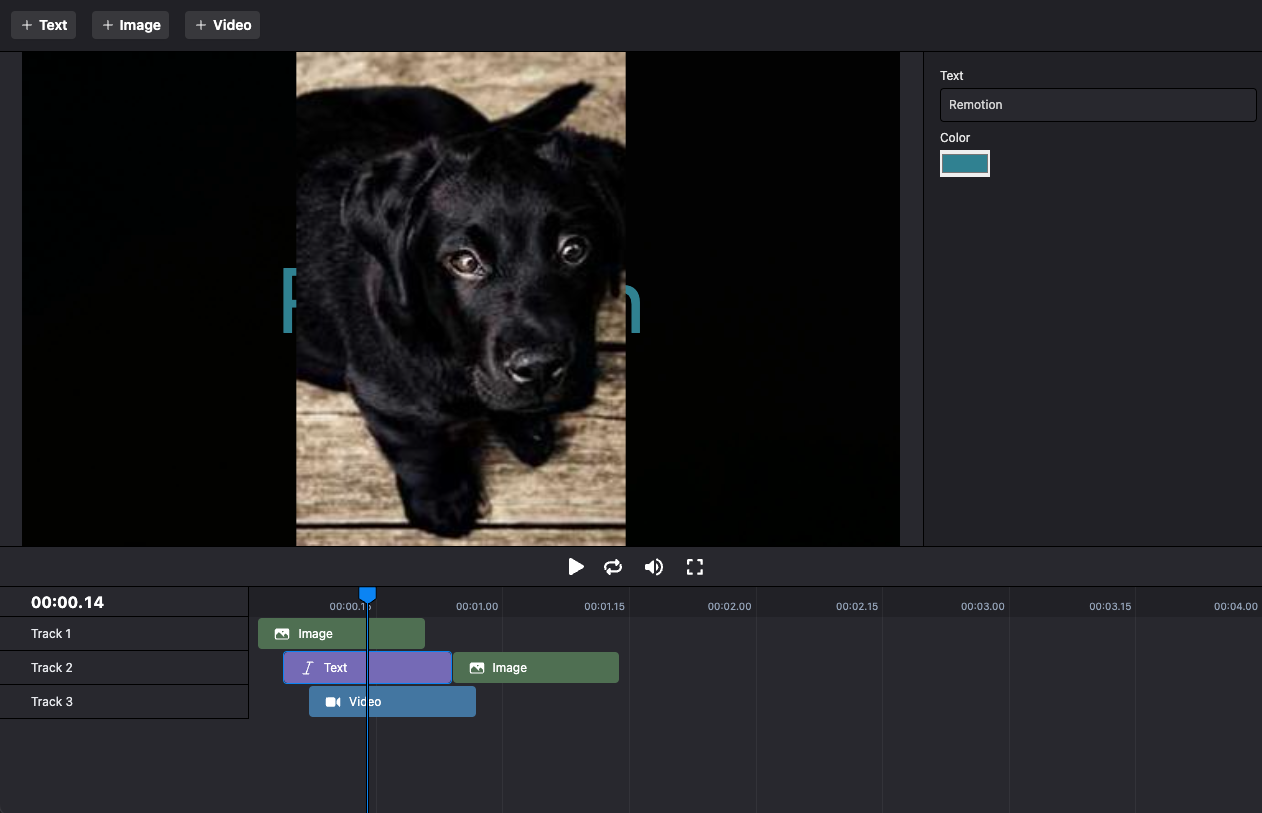
本文件从高层次描述了如何将 Remotion Player 与时间轴同步。
请阅读本文件以获得构建具有以下特性的视频编辑器的指导:
🌐 This document describes on a high-level how the Remotion Player can be synchronized with a timeline.
Read this document for guidance on building a video editor with the following characteristics:
- 多个相互叠加的音轨
- 物品可以任意放置在轨道上
- 项目可以有不同的类型(例如视频、音频、文本等)
获取 <Timeline> 组件
🌐 Get the <Timeline> component
我们提供一个可复制粘贴的 <Timeline> 组件,它遵循 Remotion 的最佳实践,并且已经处理了缩放功能。
如果你想节省时间并提前开始,你可以在 Remotion 商店购买它。
🌐 We offer a copy-pasteable <Timeline> component that follows Remotion's best practices and also already handles zoom.
If you want to save time and get a head start, you can purchase it in the Remotion Store.
你也可以自己构建时间轴组件。 以下步骤将使用我们构建时间轴组件时使用的相同方法。
🌐 You can also build your own timeline component.
The following steps will use the same approach we used to build our Timeline component.
观看“在 React 中构建视频编辑器”演讲
🌐 Watch the "Build a video editor in React" talk
观看 Jonny Burger(Remotion 的创始人)关于“在 React 中构建视频编辑器”的演讲 这里。 你将在短短 30 分钟内获得如何构建时间轴、画布、字幕和导出功能的概述。
🌐 Watch the talk "Build a video editor in React" by Jonny Burger, the creator of Remotion here.
You'll receive an outline of how to build a timeline, canvas, captioning and exporting functionality in just 30 minutes.
创建你自己的时间线
🌐 Build your own timeline
定义一个 TypeScript 类型
Item 来定义不同的项目类型。创建另一个类型来定义 Track 的结构:
types.tstypeBaseItem = {from : number;durationInFrames : number;id : string; }; export typeSolidItem =BaseItem & {type : 'solid';color : string; }; export typeTextItem =BaseItem & {type : 'text';text : string;color : string; }; export typeVideoItem =BaseItem & {type : 'video';src : string; }; export typeItem =SolidItem |TextItem |VideoItem ; export typeTrack = {name : string;items :Item []; };
remotion/Main.tsximport type {Track ,Item } from './types'; importReact from 'react'; import {AbsoluteFill ,Sequence ,OffthreadVideo } from 'remotion'; constItemComp :React .FC <{item :Item ; }> = ({item }) => { if (item .type === 'solid') { return <AbsoluteFill style ={{backgroundColor :item .color }} />; } if (item .type === 'text') { return <h1 >{item .text }</h1 >; } if (item .type === 'video') { return <OffthreadVideo src ={item .src } />; } throw newError (`Unknown item type: ${JSON .stringify (item )}`); }; constTrack :React .FC <{track :Track ; }> = ({track }) => { return ( <AbsoluteFill > {track .items .map ((item ) => { return ( <Sequence key ={item .id }from ={item .from }durationInFrames ={item .durationInFrames }> <ItemComp item ={item } /> </Sequence > ); })} </AbsoluteFill > ); }; export constMain :React .FC <{tracks :Track []; }> = ({tracks }) => { return ( <AbsoluteFill > {tracks .map ((track ) => { return <Track track ={track }key ={track .name } />; })} </AbsoluteFill > ); };
在 CSS 中,呈现在底部的元素会出现在顶部。参见:图层
渲染一个 <Player /> 组件,并将 tracks 作为 inputProps 传递。
🌐 Render
a <Player /> component and pass the tracks as inputProps.
Editor.tsximportReact , {useMemo ,useState } from 'react'; import {Player } from '@remotion/player'; import type {Item } from './types'; import {Main } from './remotion/Main'; typeTrack = {name : string;items :Item []; }; export constEditor = () => { const [tracks ,setTracks ] =useState <Track []>([ {name : 'Track 1',items : []}, {name : 'Track 2',items : []}, ]); constinputProps =useMemo (() => { return {tracks , }; }, [tracks ]); return ( <> <Player component ={Main }fps ={30}inputProps ={inputProps }durationInFrames ={600}compositionWidth ={1280}compositionHeight ={720} /> </> ); };
tracks 状态,并可以使用 setTracks 函数进行更新。
我们目前不提供如何构建时间轴组件的示例,因为每个人的需求和样式偏好都不同。
🌐 We do not currently provide samples how to build a timeline component, since everybody has different needs and styling preferences.
一个有主见的示例实现可以在 Remotion 商店 购买。
🌐 An opinionated sample implementation is available for purchase in the Remotion Store.
remotion/Timeline.tsxconstEditor :React .FC = () => { const [tracks ,setTracks ] =useState <Track []>([ {name : 'Track 1',items : []}, {name : 'Track 2',items : []}, ]); constinputProps =useMemo (() => { return {tracks , }; }, [tracks ]); return ( <> <Player component ={Main }fps ={30}inputProps ={inputProps }durationInFrames ={600}compositionWidth ={1280}compositionHeight ={720} /> <Timeline tracks ={tracks }setTracks ={setTracks } /> </> ); };
另请参阅
🌐 See also