生成 .env 文件
Cloud Run 处于 Alpha 状态,且尚未积极开发。
由于 GCP Cloud Shell 可以访问该项目,因此可以运行脚本来生成包含所需服务账户密钥和项目 ID 的 .env 文件。由于 Cloud Shell 使用已登录用户的凭据来获取项目权限,因此假设你在该项目中具有所有者角色。如果你是创建该项目的人,你将是所有者。
🌐 As GCP Cloud Shell has access to the project, a script can be run to generate a .env file with the required Service Account keys and Project ID. As Cloud Shell makes use of the logged-in user's credentials for permissions in the project, it is assumed you have the owner role on the project. If you were the one that created the project, you will be an owner.
严格控制服务账户密钥非常重要,因为它们用于验证 Remotion 项目对 GCP 的访问。.env 文件不应提交到源代码管理,也不应与任何人共享。每当不再需要服务账户密钥时,应将其删除。
🌐 It is important to have strict control over the service account keys, as they are used to authenticate the Remotion project to GCP. The .env file should not be committed to source control, and not shared with anyone. Any time you no longer require a service account key, it should be deleted.
GCP 允许每个服务账户最多有 10 个密钥。如果你已经创建了 10 个密钥,则需要先删除一个,然后才能创建另一个。下面的脚本为你提供了在终端中执行此操作的机会。
🌐 GCP allows a maximum of 10 keys per service account. If you have already created 10 keys, you will need to delete one before you can create another. The following script provides you with an opportunity to do this from within the terminal.
-
在 GCP 控制台中打开 项目仪表板,并选择你现有的 Remotion 项目。
-
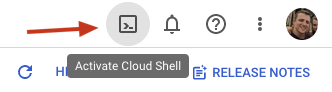
在屏幕的右上角,点击激活云端 Shell 图标
-
在 Cloud Shell 中,输入以下命令并按照提示操作。
curl -L https://github.com/remotion-dev/remotion/raw/main/packages/cloudrun/src/gcpInstaller/gcpInstaller.tar | tar -x -C . && node install.mjs第一个命令从 Remotion 仓库下载一个 tar 文件,并将其解压到当前目录。第二个命令运行安装脚本。 如果你想生成一个新的 .env 文件,或者管理已经创建的密钥,你将需要选择选项 3。
如果这是第一次在 GCP 项目中初始化 Remotion,你将需要选择选项 1。 如果你正在更新此 GCP 项目的 Remotion 版本,你将需要选择选项 1。
-
运行以下命令以查看环境变量。将它们复制到本地的
.env文件中(如果不存在则创建它):cat .env -
使用以下命令从虚拟机中删除 .env 文件:
rm .env
5. 可选:验证权限设置
🌐 5. Optional: Validate the permission setup
在你的代码库中,运行以下命令以验证 GCP 中的权限是否设置正确。只要你的 GCP 项目是使用匹配的 Remotion 版本设置的,这应该会通过。
🌐 From within your code base, run the following command to validate the permissions are setup correctly in GCP. As long as your GCP project was setup with a matching Remotion version, this should pass.
npx remotion cloudrun policies validate