闪烁

如果你的视频在渲染时闪烁或出现卡顿,这表明:
🌐 If your video flickers or suffers from choppiness during rendering, it is an indication that:
存在 多线程问题 或者多线程问题
🌐 Multi-threading issue
Remotion 的渲染过程如下:
🌐 The rendering process of Remotion works as follows:
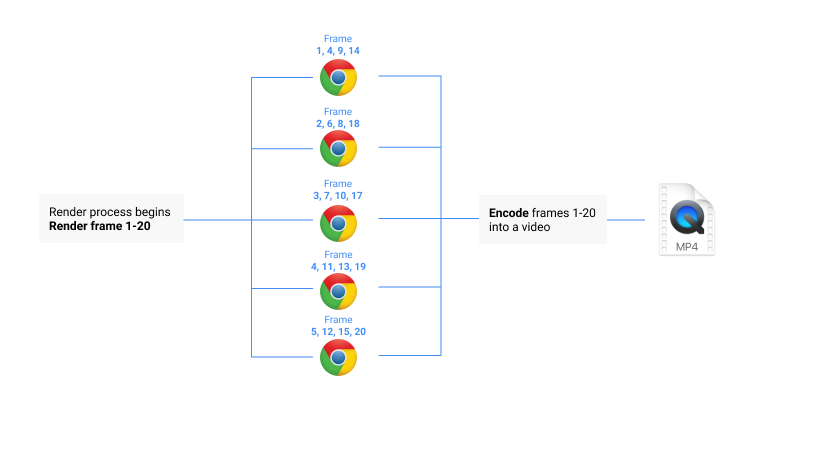
我们打开多个标签页来呈现视频,以显著加快处理速度。
标签页不会共享状态,独立于 useCurrentFrame() 运行的动画将会中断。
🌐 We open multiple tabs to render the video to speed up the process dramatically.
Tabs don't share state and animations that run independent of useCurrentFrame() will break.
解决方案
🌐 Solution
用一种使动画完全基于useCurrentFrame()的数值运行的方式对你的视频进行编码。把你的组件看作一个将帧编号转换为图片的函数。
🌐 Code your video in a way that animations run purely off the value of useCurrentFrame().
Think of your component as a function that transforms a frame number into an image.
你的组件符合以下标准吗?
🌐 Does your component satisfy the following criteria?
一个组件在多次调用时应始终显示相同的视觉效果。一个组件不应依赖于帧按顺序渲染。
当视频暂停时,组件不应进行动画。
组件不应依赖随机性 - 例外:
random()
绕过多线程
🌐 Bypass multithreading
如果你的动画在按顺序渲染帧时不会出错,用户通常会使用 --concurrency=1 标志。这在许多情况下可以解决闪烁/卡顿问题,并且如果重构的工作量太大,这是一个可行的途径。
🌐 If your animation will not break if the frames are rendered in order, users often use the --concurrency=1 flag. This will fix flickering / choppiness in many cases and is a viable path if the effort of refactoring is too big.
这种技术的缺点是速度慢得多,并且动画的正确时机仍不能得到保证。它还会通过 Remotion Lambda 阻塞渲染。
🌐 The drawback of this technique is that it is way slower and that the correct timing of the animations is still not guaranteed. It will also block rendering via Remotion Lambda.
资源加载问题
🌐 Asset loading issue
Remotion 需要知道一个资源尚未加载,以便它可以阻止渲染。否则,它将截取加载状态的屏幕截图。
🌐 Remotion needs to know that an asset is not loaded yet so it can block rendering.
Otherwise, it will take a screenshot of a loading state.
解决方案
🌐 Solution
在等待资源加载时使用<Img>
、
<Video>
、
<OffthreadVideo>
、
<Audio>
、
<Iframe>
和
<Gif>
加载数据时,使用
delayRender()
函数。
确保正确等待 字体加载完成。
fitText()
、
fillTextBox()
和
measureText()
。
避免使用
background-image 和 mask-image CSS 属性
。
闪烁的 <Html5Video> 标签
🌐 Flickering <Html5Video> tag
添加许多 <Html5Video> 标签可能会导致卡顿。
如果你遇到此问题,请考虑使用 另一个视频标签 以实现帧完美渲染。
🌐 Adding many <Html5Video> tags can lead to stutters.
If you are experiencing the problem, consider using another video tag for frame-perfect rendering.
集成
🌐 Integrations
查看第三方集成列表,看看是否有将你的动画与useCurrentFrame()同步的解决方案。
🌐 See the list of third-party integrations to see if there is a solution for synchronizing your animation with useCurrentFrame().
为什么 Remotion 会这样工作
🌐 Why Remotion works this way
- 渲染速度很重要,尤其是在服务器端渲染时。顺序渲染每一帧会对速度产生不利影响,当有可能编写并发安全的视频时,这种牺牲是不值得的。
- 在本来会卡顿的视频上设置
--concurrency=1并不能完全解决问题。结果之所以看起来还可以,往往只是巧合,因为渲染速度大致与动画速度相同。没有真正的时间同步,不同的机器上结果会有所不同。 - 确定性视频使分布式视频渲染成为可能,例如 Remotion Lambda,它可以比实时更快地渲染视频。
另请参阅
🌐 See Also