<Folder>
通过将 <Composition /> 封装在 <Folder /> 中,如果你有很多作品,你可以在侧边栏中将它进行可视化分类。
🌐 By wrapping a <Composition /> inside a <Folder />, you can visually categorize it in your sidebar, should you have many compositions.
示例
🌐 Example
import {Composition , Folder } from 'remotion';
export const Video = () => {
return (
<>
<Folder name ="Visuals">
<Composition id ="CompInFolder" durationInFrames ={100} fps ={30} width ={1080} height ={1080} component ={Component } />
</Folder >
<Composition id ="CompOutsideFolder" durationInFrames ={100} fps ={30} width ={1080} height ={1080} component ={Component } />
</>
);
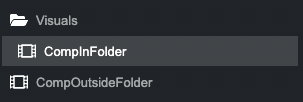
};将在边栏中创建一个看起来像这样的树状结构:
🌐 will create a tree structure in the sidebar that looks like this:
文件夹行为
🌐 Folder behavior
- 它们只在 Remotion Studio 中视觉上改变侧边栏,并没有其他行为。
- 文件夹名称只能包含
a-z、A-Z、0-9和-。 - 文件夹可以嵌套。
兼容性
🌐 Compatibility
| Browsers | Environments | |||||
|---|---|---|---|---|---|---|
Chrome | Firefox | Safari | ||||
另请参阅
🌐 See also