自动删除渲染
从 v4.0.32 起可用
🌐 available from v4.0.32
要在一段时间后自动删除渲染及相关文件,你需要:
🌐 To automatically delete renders and associated files after some time, you need to:
在 AWS 存储桶上启用生命周期规则。deleteAfter 选项渲染视频。
应用生命周期规则
🌐 Apply the lifecycle rules
要在桶上设置生命周期规则,你需要为你的用户拥有 s3:PutLifecycleConfiguration 权限。
🌐 To put a lifecycle rule on the bucket, you need to have the s3:PutLifecycleConfiguration permission for your user.
- 如果你在 4.0.32 之后设置 Remotion Lambda,你就会自动拥有它。
- 如果你之前设置过 Remotion Lambda,请执行以下操作:
- 升级到至少 Remotion 4.0.32。
- 点击这里 进入 AWS 控制台的用户部分。
- 选择你的用户。
- 在“权限策略”下,点击你的策略(蓝色下划线)
- 选择“JSON”模式进行编辑。
- 在
"Sid": "Storage"部分,将"s3:PutLifecycleConfiguration"添加到"Action"数组中。 - 保存。
使用 --enable-folder-expiry 选项重新部署站点。此操作将修改 S3 存储桶以应用 AWS 生命周期规则。
🌐 Redeploy the site with the --enable-folder-expiry option. This operation will modify the S3 bucket to apply AWS Lifecycle Rules.
- CLI
- Node.JS
In the command linenpx remotion lambda sites create --site-name=my-site-name --enable-folder-expiry
deploy.mjsimport {deploySite ,getOrCreateBucket } from '@remotion/lambda'; importpath from 'path'; const {bucketName } = awaitgetOrCreateBucket ({region : 'us-east-1',enableFolderExpiry : true, }); const {serveUrl } = awaitdeploySite ({entryPoint :path .resolve (process .cwd (), 'src/index.ts'),bucketName , // use the bucket with lifecyle rulesregion : 'us-east-1', });console .log (serveUrl );
验证它是否有效
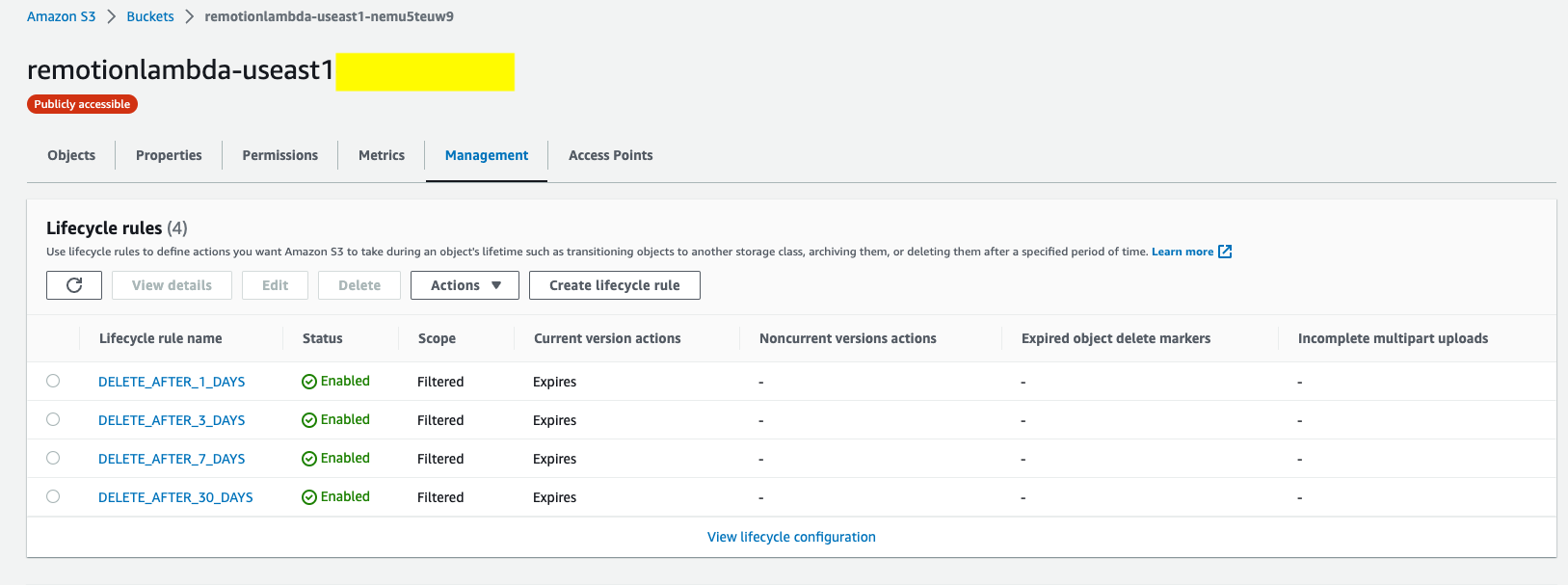
在你的 S3 桶中,在“管理”下,你应该看到 4 条生命周期规则。
触发带有过期时间的渲染
🌐 Trigger a render with expiration
有效值是 "1-day"、"3-days"、"7-days" 和 "30-days"。
🌐 Valid values are "1-day", "3-days", "7-days" and "30-days".
- CLI
- renderMediaOnLambda()
- renderStillOnLambda()
npx remotion lambda render testbed-v6 react-svg --delete-after="1-day"render.tsimport {renderMediaOnLambda } from '@remotion/lambda/client'; const {bucketName ,renderId } = awaitrenderMediaOnLambda ({region : 'us-east-1',functionName : 'remotion-render-bds9aab',composition : 'MyVideo',serveUrl : 'https://remotionlambda-qg35eyp1s1.s3.eu-central-1.amazonaws.com/sites/bf2jrbfkw',codec : 'h264',deleteAfter : '1-day', });
render.tsimport {renderStillOnLambda } from '@remotion/lambda/client'; const {bucketName ,renderId } = awaitrenderStillOnLambda ({region : 'us-east-1',functionName : 'remotion-render-bds9aab',composition : 'MyVideo',serveUrl : 'https://remotionlambda-qg35eyp1s1.s3.eu-central-1.amazonaws.com/sites/bf2jrbfkw',inputProps : {},privacy : 'public',imageFormat : 'png',deleteAfter : '1-day', });
验证它是否有效
在查看对象属性时,所有文件都应设置过期规则和过期日期。

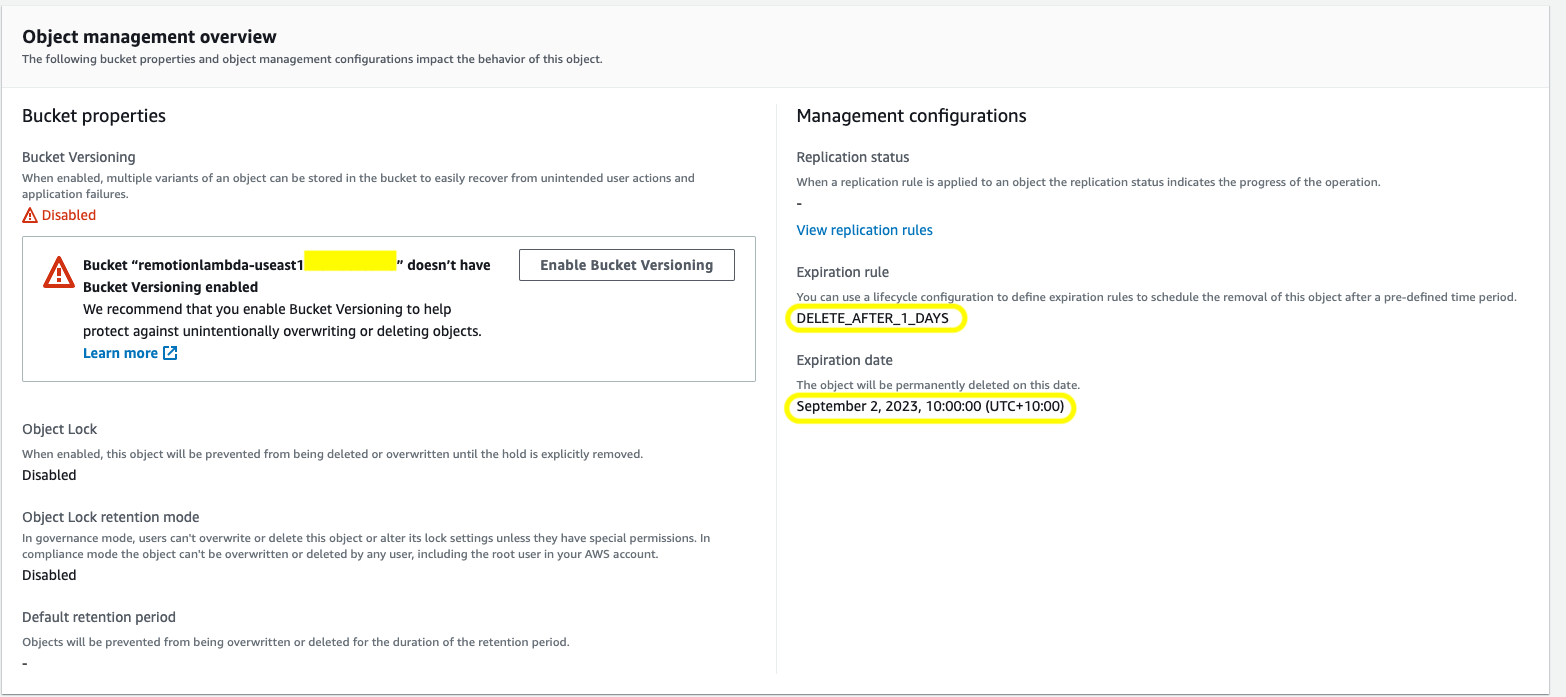
AWS 不会在确切的时间删除文件,但删除会发生。
🌐 AWS does not delete the file at the exact time, but the deletion will happen.
它是如何运作的
🌐 How it works
通过应用 AWS 生命周期规则,我们指示 AWS S3 根据其前缀删除文件。当 deleteAfter 被定义为 "1-day" 值时,renderId 将以 1-day 为前缀,并且 S3 键将以 renders/1-day-* 开头,对其应用删除规则。删除的依据是文件/文件夹的 Last modified date。
🌐 By applying the AWS Lifecycle rules, we are instructing AWS S3 to delete files based on their prefixes. When deleteAfter is defined with a value of "1-day", the renderId will be prefixed with 1-day, and the S3 key will start with renders/1-day-*, to which the deletion rule will be applied.
The basis of the deletion is based on the Last modified date of the file/folder.
| 渲染前缀 |
|---|---|
1天 | renders/1-day |
3天 | renders/3天 |
7天 | 渲染/7天 |
30天 | 渲染/30天 |
另请参阅
🌐 See also