并发
Remotion Lambda 是一个高度并发的分布式视频渲染系统。这意味着视频渲染工作被分配到许多 Lambda 函数中。具体可以定义多少个 Lambda 函数,由你决定,或者让 Remotion 的默认设置来决定。
🌐 Remotion Lambda is a highly concurrent distributed video rendering system. That means that the video rendering work is split up across many Lambda functions. How many Lambda functions exactly can be defined by you, or you let Remotions defaults decide.
设置并发
🌐 Setting the concurrency
你可以通过 framesPerLambda 选项(或通过 CLI 使用 --frames-per-lambda)来设置并发数。
🌐 You can set the concurrency via the framesPerLambda option (or --frames-per-lambda via CLI).
或者,你可以使用 concurrency 选项(或通过 CLI 使用 --concurrency)直接指定 Lambda 函数的数量,而无需知道视频时长。
🌐 Alternatively, you can use the concurrency option (or --concurrency via CLI) to specify the number of Lambda functions directly without needing to know the video duration.
并发性被定义为 frameCount / framesPerLambda。这意味着你设置的 framesPerLambda 越高,并发性就越低。
🌐 The concurrency is defined as frameCount / framesPerLambda. That means that the higher you set framesPerLambda, the lower the concurrency gets.
示例:你渲染一个视频,其 durationInFrames 为 300,framePerLambda 设置为 15。并发数为 300 / 15 = 20。
默认值
🌐 Default values
默认情况下,Remotion 会为 framesPerLambda 选择 20 到 ∞ 之间的值。视频越长,并发量越高。作为基线,无论视频多短,每个 Lambda 至少渲染 20 帧。
🌐 By default, Remotion chooses a value between 20 and ∞ for framesPerLambda. The longer the video, the higher the concurrency. As a baseline, no matter how short the video, always at least 20 frames are rendered per Lambda.
下图显示了如何根据帧数选择 framesPerLambda 和隐含并发性:
🌐 The following chart shows how the framesPerLambda and the implied concurrency is chosen based on the frame count:
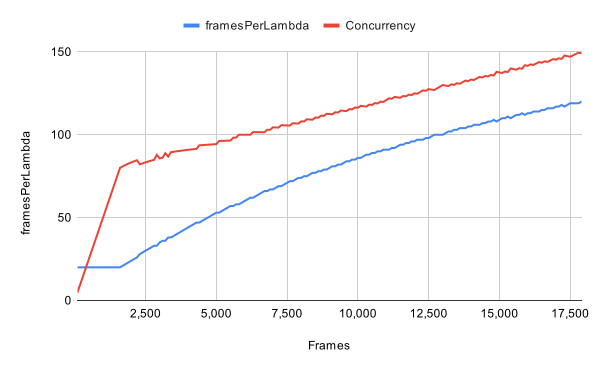
确定 framesPerLambda 参数的代码是:
🌐 The code for determining the framesPerLambda parameter is:
import {interpolate } from 'remotion';
const bestFramesPerLambdaParam = (frameCount : number) => {
// Between 0 and 10 minutes (at 30fps), interpolate the concurrency from 75 to 150
const concurrency = interpolate (frameCount , [0, 18000], [75, 150], {
extrapolateRight : 'clamp',
});
// At least have 20 as a `framesPerLambda` value
const framesPerLambda = Math .max (frameCount / concurrency , 20);
// Evenly distribute: For 21 frames over 2 lambda functions, distribute as 11 + 10 ==> framesPerLambda = 11
const lambdasNeeded = Math .ceil (frameCount / framesPerLambda );
return Math .ceil (frameCount / lambdasNeeded );
};The default
framesPerLambda is 20并发限制
🌐 Concurrency limits
确保你只在这些限制范围内设置参数,以确保渲染不会出现任何错误:
🌐 Ensure that you only set parameter within these limits to ensure the renders don't throw any errors:
- 最低
framesPerLambda:5(在 Remotion 4.0.331 之前为 4) - 最大并发数:200
Remotion Lambda 的默认值绝不会超出这些范围。
🌐 The Remotion Lambda defaults will never go outside these bounds.
功能太多
🌐 "Too many functions"
如果你遇到错误:
🌐 If you get an error:
太多函数:此渲染将导致生成 [X] 个函数。我们将此数量限制为 200 个函数,因为更多函数将导致收益递减。
你为 framesPerLambda 设置了一个非常低的值,这将导致生成许多函数。根据我们的经验,如果并发性超过这个点,渲染速度不会变快。
🌐 You have set a value for framesPerLambda that is very low and would cause many functions to be spawned. In our experience, renders will not become faster if the concurrency is increased beyond this point.
- 我们建议将
framesPerLambda值设置为null。Remotion 将选择一个保持在范围内的合理值。 - 如果你不想使用默认值,请确保你不要设置超出上述定义范围的值。