自定义层
Lambda 函数默认包含 Chrome 和基础字体。
🌐 The Lambda function includes Chrome and base fonts by default.
在一些高级用例中,你可能想要替换堆栈的某些部分:
🌐 In some advanced use cases, you want to replace certain parts of the stack:
- 使用另一个 Chrome 版本(你可能需要自己构建)
- 替换默认字体或表情符号
在创建自定义堆栈之前,请随时联系我们,看看 Remotion 是否可以在上游提供更改。
🌐 Before you create a custom stack, feel free to contact us to see if Remotion can provide the changes upstream.
还要考虑到 AWS Lambda 层解压后的总大小可能不能超过 250MB,因此你需要牺牲等量的其他文件。
🌐 Also consider that the AWS Lambda layers cumulatively may not exceed 250MB extracted, so you need to sacrifice an equal amount of other files.
如果你只是想添加字体,我们建议使用 Web 字体 。
🌐 If you just want to add fonts, we recommend to use Web fonts instead.
默认层v4.0.205
🌐 Default layersv4.0.205
在创建自定义堆栈之前,请考虑使用我们的层选项:
🌐 Consider using our layer options before creating a custom stack:
使用默认选项(--runtime-preference=cjk 或无选项)时:
🌐 With the default option (--runtime-preference=cjk or no option):
| 项目 | 大小 |
|---|---|
| chromium | 196 MB |
| emoji-google | 9.9 MB |
| fonts | 1.9 MB |
| cjk | 16 MB |
| 总计 | 223.8 MB |
使用选项 --runtime-preference=apple-emojis:
🌐 With the option --runtime-preference=apple-emojis:
| 项目 | 大小 |
|---|---|
| chromium | 196 MB |
| emoji-apple | 45 MB |
| 字体 | 1.9 MB |
| 总计 | 242.9 MB |
请注意,启用 Apple 表情符号后,为了保持在 250 MB 的限制内,对 CJK(中文、日文、韩文)字符的支持将被移除。Google 表情符号也将被移除。
确保 Remotion 版本
🌐 Ensure Remotion version
从 v3.0.17 起可以自定义 Remotion Lambda 层。
Lambda 二进制文件可能会在 Remotion 的小版本中发生变化,保持版本更新是你的责任。
🌐 Customizing Remotion Lambda Layers is possible from v3.0.17.
Lambda binaries might change in minor Remotion versions, it is your responsibility to keep your versions up to date.
创建自定义二进制文件
🌐 Creating a custom binary
去 remotion-dev/lambda-binaries 仓库并克隆它。
🌐 Go to the remotion-dev/lambda-binaries repository and clone it.
文件夹 chromium 和 fonts 包含 ARM 版本的二进制文件。x64 版本已被取消。
🌐 The folders chromium and fonts contain the binaries for the ARM version. The x64 version has been discontinued.
将你想要的文件放入相应的文件夹中——例如,将 Apple 表情符号字体 AppleColorEmoji.ttf 添加到 fonts/.fonts/NotoSans/ 文件夹中。
🌐 Put the files that you want in the corresponding folders - for example, add the Apple Emoji Font AppleColorEmoji.ttf into the fonts/.fonts/NotoSans/ folder.
由于 AWS Lambda 层解压后的大小不能超过 250MB,我们需要牺牲相同量的其他文件——例如通过删除 fonts/.fonts/NotoColorEmoji.ttf 和 fonts/.fonts/NotoSansCJKjp-Regular.otf。
🌐 Since the AWS Lambda layers may not exceed 250MB extracted, we need to sacrifice an equal amount of other files - for example by removing fonts/.fonts/NotoColorEmoji.ttf and fonts/.fonts/NotoSansCJKjp-Regular.otf.
你可以通过运行以下命令查看文件夹的大小:
🌐 You can see the size of the folders by running:
sh size.sh如果你完成了更改,请运行:
🌐 If you are done with your changes, run:
sh make.sh这将压缩图层并将它们作为工件放入 out 目录中。
🌐 This will zip the layers and put them as artifacts in the out directory.
创建 Lambda 层
🌐 Creating a Lambda layer
- 转到你的 AWS 控制台,选择 Lambda 产品,然后选择“层”
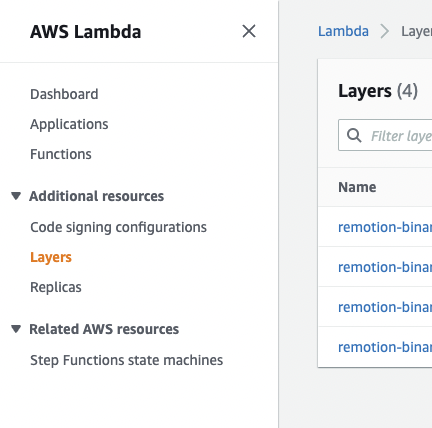
- 选择“创建图层”并填写名称。将
out文件夹中创建的图层上传到表单中。“兼容架构”、“兼容运行时”和“许可证”字段是可选的。 - 一旦创建了图层,你将得到一个版本 ARN(例如:
arn:aws:lambda:us-east-1:123456789012:layer:apple-emoji:1)。请复制它。
你需要为每个想要使用 Remotion Lambda 的 AWS 区域执行此操作。
更新 Lambda 函数
🌐 Update the Lambda function
在继续之前,确保已部署 Remotion Lambda 函数。
🌐 Before you continue, make sure a Remotion Lambda function is deployed.
要更换已部署的 Lambda 函数的层,你可以通过 AWS 控制台操作,或者使用一个 Node.JS 脚本,在每次函数部署后运行。
🌐 To switch out the layer of a deployed Lambda function, you can either do it via the AWS console or use a Node.JS script that you can run after every function deploy.
- Node.JS
- AWS console
- 前往你的 AWS 控制台,选择 Lambda 产品,然后选择你想要更新的 Lambda 函数。
- 点击“图层”:
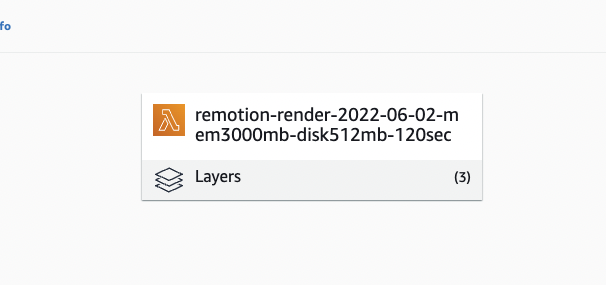
- 点击“编辑”,然后选择你想要替换的图层,然后点击“删除”,最后点击“保存”。
- 返回后,点击“添加图层”,然后点击“指定 ARN”,然后粘贴你在上一步中获取的图层版本 ARN。
- 点击“验证”,然后点击“添加”。
恭喜!你已经自定义了你的 Lambda 函数。
🌐 Congrats! You customized your Lambda function.
在你可以通过 Node.JS API 更新函数之前,你需要为你的用户角色添加另一个规则:
🌐 Before you can update a function via the Node.JS APIs, you need to add another rule to your user role:
[
{
"Sid": "UpdateFunction",
"Effect": "Allow",
"Action": ["lambda:GetFunctionConfiguration", "lambda:UpdateFunctionConfiguration"],
"Resource": ["arn:aws:lambda:*:*:function:remotion-render-*"]
},
{
"Sid": "GetOwnLayerVersion",
"Effect": "Allow",
"Action": ["lambda:GetLayerVersion"],
"Resource": ["*"]
}
]给定一个区域、函数名称、要删除的层和要添加的层,你可以使用以下代码片段来使用自定义层更新函数
🌐 Given a region, function name, layer to remove and layer to add, you can use the following snippet to update a function with custom layers
import {AwsRegion, getAwsClient} from '@remotion/lambda';
// Customize these parameters
const REGION: AwsRegion = 'us-east-1';
const FUNCTION_NAME = 'remotion-render-2022-06-02-mem3000mb-disk2048mb-120sec';
const LAYER_TO_REMOVE = /fonts/;
const LAYER_TO_ADD = 'arn:aws:lambda:us-east-1:1234567891:layer:apple-emoji:1';
const {client, sdk} = getAwsClient({
region: REGION,
service: 'lambda',
});
const fnConfig = await client.send(
new sdk.GetFunctionConfigurationCommand({
FunctionName: FUNCTION_NAME,
}),
);
if (!fnConfig) {
throw new Error(`Function ${FUNCTION_NAME} not deployed`);
}
await client.send(
new sdk.UpdateFunctionConfigurationCommand({
FunctionName: FUNCTION_NAME,
Layers: [...(fnConfig.Layers ?? []).filter((l) => !l.Arn?.match(LAYER_TO_REMOVE)).map((l) => l.Arn as string), LAYER_TO_ADD],
}),
);另请参阅
🌐 See also