在 Remotion Lambda 中使用无服务器框架
本指南将向你展示如何使用 Remotion 与 Serverless Framework (serverless.com)。
🌐 This guide will show you how to use Remotion with Serverless Framework (serverless.com).
为了补充本指南,创建了两个项目。remotion-app 包含一个 Remotion 组合以及用于在 AWS 中部署和删除 Remotion Lambda 基础设施的实用脚本。
🌐 To supplement this guide, two projects have been created. The remotion-app contains a Remotion composition and utility scripts for deploying and deleting Remotion Lambda infrastructure in AWS.
serverless-app 包含一个部署了两个 Lambda 函数的 Serverless 项目。render_handler 函数在被调用时,会调用已部署的 Remotion Lambda 函数来渲染视频。progress_handler 函数跟踪渲染的进度。
🌐 The serverless-app contains a Serverless project that deploys two Lambda functions. The render_handler function, when invoked, will call the deployed Remotion Lambda function to render a video. The progress_handler function tracks the progress of the render.
两个函数都配置为通过 API Gateway 调用,并由 Cognito 保护。API Gateway 和 Cognito 的设置会在执行 serverless deploy 时由 Serverless 部署脚本自动创建。这假设你具备使用 Serverless Framework 的知识,并了解 serverless.yml 的语法。
🌐 Both functions are configured to be invoked through API Gateway and are secured by Cognito. The API Gateway and Cognito setup is automatically created by the Serverless deployment script upon execution of serverless deploy.
This assumes that you have knowledge in using Serverless Framework and understand the syntax of serverless.yml.
remotion-app
本文件包含将 remotion Lambda 设置并安装到你的 AWS 账户的说明。此部署设计用于在你的本地计算机上执行。
🌐 This contains instructions for setting up and installing the remotion Lambda to your AWS account. This deployment is designed to be executed on your local machine.
先决条件
🌐 Prequisites
- 确保你的本地 AWS 配置文件能够部署到 AWS,或者按照此指南为你的本地计算机设置用户。
设置
🌐 Setup
1. 克隆或下载项目
🌐 1. Clone or download the project
该项目可以在 remotion-serverless project 找到。
🌐 The project can be found at remotion-serverless project.
git clone https://github.com/alexfernandez803/remotion-serverless2. 进入 remotion-serverless 并导航到 remotion-app 目录
🌐 2. Go to remotion-serverless and traverse to the remotion-app directory
cd remotion-serverless && cd remotion-app3. 安装依赖
🌐 3. Install dependencies
- npm
- yarn
- pnpm
npm ipnpm iyarn4. 配置凭据
🌐 4. Configure credentials
需要将一个 .env 文件添加到目录中,以配置项目在部署时将使用的 AWS 凭证。
🌐 An .env file needs to be added to the directory to configure the AWS credentials that the project will use for deployment.
.envAWS_KEY_1= AWS_SECRET_1=
如果你想进行负载均衡,可以使用多个账户。
🌐 You can use multiple accounts if you would like to do load-balancing.
.envAWS_KEY_1= AWS_SECRET_1= AWS_KEY_2= AWS_SECRET_2=
AWS_KEY_* 和 AWS_SECRET_* 代表被允许部署 Remotion Lambda 函数的 AWS 账户凭证。
🌐 The AWS_KEY_* and AWS_SECRET_* represent the AWS account credentials that are allowed to deploy the Remotion Lambda function.
5. 部署 Lambda 函数
🌐 5. Deploy the Lambda function
该项目在 package.json 中配置了部署脚本。
🌐 The project has the deployment script configured in package.json.
package.json{ // ... "scripts": { "test": "echo \"Error: no test specified\" && exit 1", "deploy-fn": "ts-node src/infra/deploy-lambda-fn.ts", "delete-fn": "ts-node src/infra/delete-lambda-fn.ts", "render-fn": "ts-node src/infra/local-render-fn.ts" } }
- npm
- yarn
- pnpm
npm run deploy-fnpnpm run deploy-fnyarn deploy-fn这将执行 部署函数,将 Remotion Lambda 部署到你的 AWS 账户。
🌐 This will execute the deploy function that will deploy the Remotion Lambda to your AWS account.
deployment logsFound 1 accounts. Deploying... Ensured function="remotion-render-3-3-78-mem2048mb-disk2048mb-240sec" to region="ap-southeast-2" in account 1 entryPoint /xxxx/code/remotion-serverless/remotion-app/src/index.tsx Deployed site to region="ap-southeast-2" in account 1 with bucket="remotionlambda-apsoutheast2-xxxxx" under serveUrl="https://remotionlambda-apsoutheast2-xxxxx.s3.ap-southeast-2.amazonaws.com/sites/remotion-render-app-3.3.78/index.html"
6.(可选)如果不需要,删除 Lambda 函数。
🌐 6. (Optional) Delete the lambda function if not needed.
- npm
- yarn
- pnpm
npm run delete-fnpnpm run delete-fnyarn delete-fn这将执行 删除功能,从你的 AWS 账户中移除 Remotion Lambda 函数。
🌐 This will execute the delete function which removes the Remotion Lambda function from your AWS account.
serverless-app
本指南包含将 Lambda 服务 render_handler 和 progress_handler 设置和安装到你的 AWS 账户的说明。本指南旨在在你的本地电脑上执行。
🌐 This contains instructions for setting up and installing Lambda services render_handler and progress_handler to your AWS account. This guide is designed to be executed on your local machine.
上下文
🌐 Context
此应用是由来自 serverless examples repo 的一个应用示例创建的,并使用此命令引导了该应用。
🌐 This application has been created by an application example from serverless examples repo and bootstrapped the application using this command.
serverlessserverless --template-url=https://github.com/serverless/examples/tree/v3/aws-node-http-api-typescript
创建 serverless 应用后,通过使用终端导航到应用目录来将其更新到最新版本。
🌐 After creating the serverless application, update it to the latest version by navigating to the application directory using the terminal.
npm update先决条件
🌐 Prerequisites
- 在本地机器上配置 AWS 部署配置文件,要在本地机器上配置 AWS 部署配置文件,请按照 serverless 网站 提供的指南操作。
- 要安装 Serverless,请按照此 指南 操作。
- 注册一个无服务器账户,这将为你提供一个仪表板,其中包含诸如函数 Lambda 调用等功能。
- 在你的无服务器账户上创建一个 organization 来关联你的
lambda应用。 - 一个名为
remotion-executionrole-policy的 AWS 策略是根据这个指南创建的。
设置
🌐 Setup
1. 克隆或下载项目
🌐 1. Clone or download the project
该项目可以在 remotion-serverless project 找到。
如果在上一步未完成,请使用以下命令克隆项目:
🌐 The project can be found at remotion-serverless project.
If not done in the previous step, clone the project using:
git clone https://github.com/alexfernandez803/remotion-serverless2. 转到 remotion-serverless 并进入 serverless-app 目录
🌐 2. Go to remotion-serverless and traverse to serverless-app directory
cd remotion-serverless && cd serverless-app3. 安装依赖
🌐 3. Install dependencies
- npm
- yarn
- pnpm
npm ipnpm iyarn4. 配置无服务器执行角色
🌐 4. Configure the serverless execution role
每个函数都被分配了一个名为 remotionLambdaServerlessRole 的角色,因为两个函数对 Remotion Lambda 的访问模式相同。
🌐 Each of the function is assigned with a role named remotionLambdaServerlessRole as both function has the same access patterns to the Remotion Lambda.
步骤
🌐 Steps
- 前往 AWS 账户的 IAM 角色部分
- 点击“创建角色”。
- 在“用例”下,选择“Lambda”。点击下一步。
- 在“权限策略”下,筛选
remotion-executionrole-policy并勾选复选框以分配此策略。这个policy应该已经创建,如果没有,请按照此 指南 进行设置。 - 此外,仍然在“权限策略”中清除筛选器,然后再次筛选
AWSLambdaBasicExecutionRole。勾选复选框并点击下一步。 - 在最后一步,准确命名角色
remotionLambdaServerlessRole。其他字段可以保持原样。 - 点击“创建角色”以确认。
这一步创建了一个名为 remotionLambdaServerlessRole 的角色,拥有来自 remotion-executionrole-policy 和 AWSLambdaBasicExecutionRole 的权限,这允许 Lambda 函数创建 Cloudwatch 日志。该角色在 serverless.yml 文件中被两个函数引用,使得这两个 Lambda 函数能够渲染视频并检查渲染进度。
🌐 This steps creates a role named remotionLambdaServerlessRole with permissions from remotion-executionrole-policy and AWSLambdaBasicExecutionRole which allows the lambda function to create Cloudwatch logs. The role is referenced by the two functions in the serverless.yml file, which enables the two Lambda functions to render video and check the progress of the render.
5. 登录无服务器
🌐 5. Login into serverless
在 serverless-app 目录下,执行 serverless 命令。
🌐 From the serverless-app directory, execute the serverless command.
serverless login按照提示,选择 Serverless Framework Dashboard,这将让你登录无服务器网站,以便你的应用可以拥有一个仪表板。
🌐 Follow the prompt, select Serverless Framework Dashboard, this will log you into the serverless website so that your application can have a dashboard.
6. 初始化无服务器项目
🌐 6. Initialize the serverless project
在 serverless-app 目录下,执行 serverless 命令。
🌐 From the serverless-app directory, execute the serverless command.
serverless这将为你的项目设置部署。
🌐 This will setup your project for deployment.
serverlessserverless Running "serverless" from node_modules Your service is configured with Serverless Dashboard and is ready to be deployed. ? Do you want to deploy now? (Y/n)
选择 'n' 作为提示的答案。
🌐 Select 'n' for the answer of the prompt.
7. 部署无服务器项目
🌐 7. Deploy the serverless project
来自 serverless-app 目录。
🌐 From the serverless-app directory.
serverless deployserverless deploy
deploy responseserverless deploy Running "serverless" from node_modules Deploying api-render-video to stage dev (ap-southeast-2) Compiling with Typescript... Using local tsconfig.json - tsconfig.json Typescript compiled. ✔ Service deployed to stack api-render-video-dev (101s) dashboard: https://app.serverless.com/changeme/apps/aws-remotion-serverless/api-render-video/dev/ap-southeast-2 endpoints: POST - https://XXXXX.execute-api.ap-southeast-2.amazonaws.com/dev/render GET - https://XXXXX.execute-api.ap-southeast-2.amazonaws.com/dev/render/{renderId} functions: render: api-render-video-dev-render (44 MB) render_progress: api-render-video-dev-render_progress (44 MB)
无服务器应用配置为通过 serverless dashboard 与 changeme 组织仪表板关联。
🌐 The serverless application is configured to be associated in changeme organization dashboard from serverless dashboard.
serverless.ymlorg: changeme app: aws-remotion-serverless service: api-render-video ....
8. 如果不再需要,从你的 AWS 账户中移除无服务器项目
🌐 8. Remove the serverless project from your AWS account, if not needed anymore
来自 serverless-app 目录。
🌐 From the serverless-app directory.
serverless remove与 API 交互
🌐 Interacting with the API
该 API 需要授权令牌才能进行交互。要获取令牌,首先前往无服务器仪表板以检索输出,例如 UserPoolRegion、UserPoolId 和 UserPoolClientId,这些用于与 Cognito 进行身份验证。如果你没有前端应用,你可以按照此 指南 手动为 API 创建用户和身份验证令牌。
🌐 The API requires an authorization token to interact with it. To obtain the token, first go to the serverless dashboard to retrieve outputs such as UserPoolRegion, UserPoolId, and UserPoolClientId, which are used to authenticate with Cognito. If you do not have a frontend application, you can create a user and an authentication token manually for the API by following this guide.
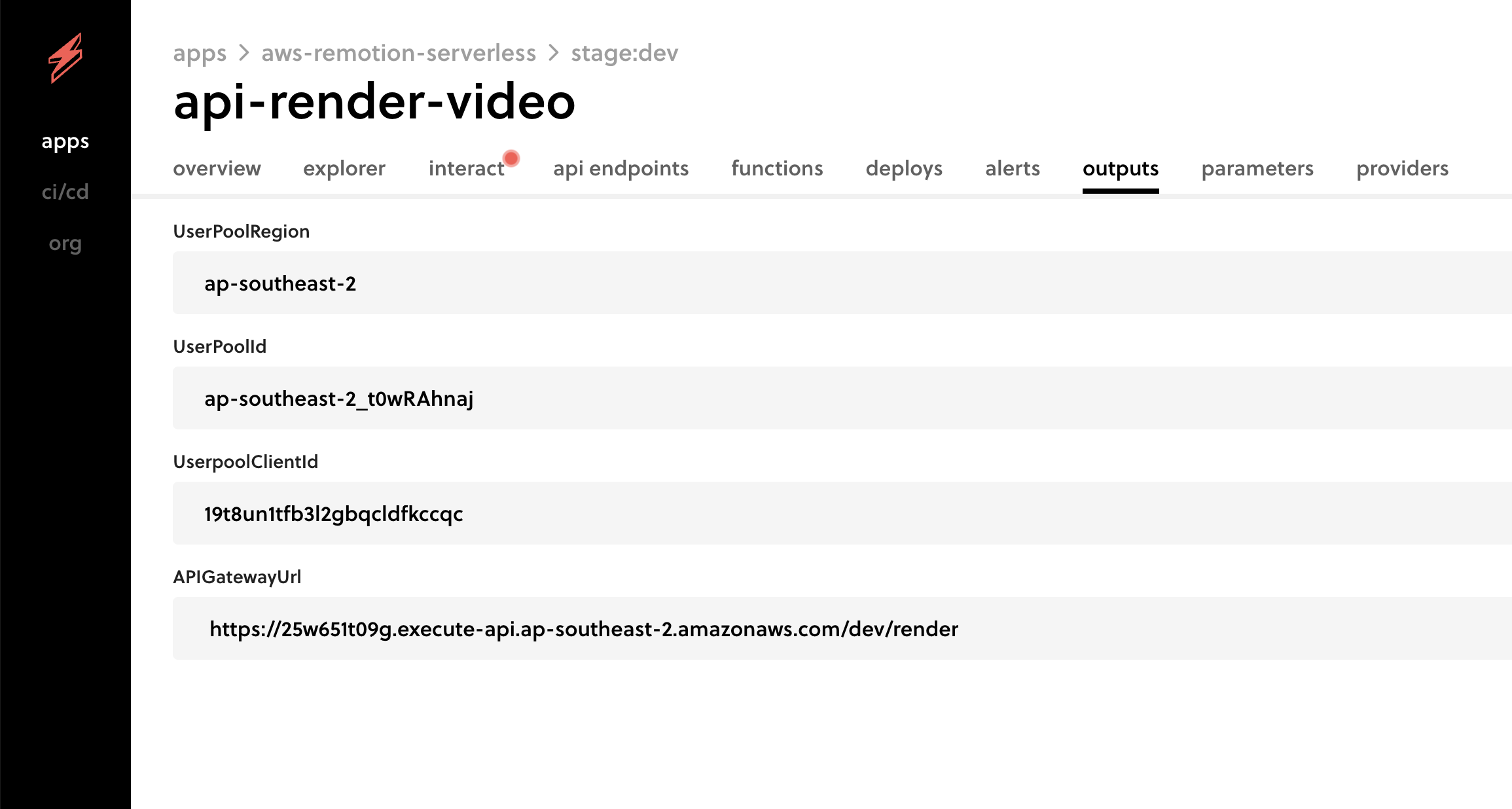
根据指南,YOUR_USER_POOL_CLIENT_ID 是 UserpoolClientId,YOUR_USER_POOL_ID 是 UserPoolId,步骤应按照获取 IdToken 的顺序进行。
🌐 From the guide, YOUR_USER_POOL_CLIENT_ID is UserpoolClientId and YOUR_USER_POOL_ID is the UserPoolId, the steps should be followed up to retrieving the IdToken.
基础 API URL 是来自仪表板输出 APIGatewayUrl 的 https://25w651t09g.execute-api.ap-southeast-2.amazonaws.com/dev/render。
🌐 The base API URL is https://25w651t09g.execute-api.ap-southeast-2.amazonaws.com/dev/render from the dashboard output APIGatewayUrl.
1. 渲染视频
🌐 1. Render a video
render videocurl --location --request POST 'https://xxxxxxxx.execute-api.ap-southeast-2.amazonaws.com/dev/render' \ --header 'Authorization: Bearer eyJraWQiOiJMVVVVZGtIQ1JXWEEyWEEXXXXXXXXXjMKR1t5S-oA'
response{ "message": "Video sent for rendering.", "renderId": "i9xnfrgXXXX", "bucketName": "remotionlambda-apsoutheast2-xxxxxxxx" }
这将启动视频的渲染并提供带有 renderId 和 bucketName 的输出。Lambda 函数的代码位于 这里。
🌐 This will initiate the render of the video and provide output with the renderId and bucketName. The code for the Lambda function is located here.
2. 获取渲染进度
🌐 2. Get the progress of the render
progresscurl --location --request GET 'https://xxxxxxxx.execute-api.ap-southeast-2.amazonaws.com/dev/render/i9xnfrgXXXX?bucketName=remotionlambda-apsoutheast2-xxxxxxxx' \ --header 'Authorization: Bearer eyJraWQiOiJMVVVVZGtIQ1JXWEEXXXXXXXXXXXvaQ'
response{ "message": "Render found.", "renderId": "i9xnfrgXXXX", "bucketName": "remotionlambda-apsoutheast2-xxxxxxxx", "finality": { "type": "success", "url": "https://s3.ap-southeast-2.amazonaws.com/remotionlambda-apsoutheast2-xxxxxxxx/renders/i9xnfrgXXXX/out.mp4" }, "mediaUrl": "https://remotionlambda-apsoutheast2-xxxxxxxx.s3.ap-southeast-2.amazonaws.com/renders/i9xnfrgXXXX/out.mp4?X-Amz-Algorithm=AWS4-HMAC-SHA256&X-Amz-Content-Sha256=UNSIGNED-PAYLOAD&X-Amz-Credential=ASIAZ3B4C6O75ZTGPMJ4%2F20230128%2Fap-southeast-2%2Fs3%2Faws4_request&X-Amz-Date=20230128T073123Z&X-Amz-Expires=900&X-Amz-Security-Token=IQXXXXXXXXV%2BWIoTQ5CvZXcljmGUIOkllDRsnmrRGNYvY8IVn8FRQmt%2Bc8%2BJQdiG0ShI0y82jB2s%2BbkaPf%2FJNDrSjO5tBo8%2FXwtaP2z9PewUIND1yMm4TkOUMXXXXXn6j&X-Amz-Signature=0881241614cd6c778b1XXXXXX42941c&X-Amz-SignedHeaders=host&x-id=GetObject" }
此 API 将提供渲染的进度详情,指示其是 success 还是 failure。如果视频渲染完成,它将提供 mediaUrl,这是一个预签名 URL,可用于下载视频。Lambda 函数的代码位于 这里。
🌐 This API will provide the progress details of the render, indicating whether it is a success or failure. If the video render is completed, it will provide the mediaUrl, which is a pre-signed URL that makes the video downloadable. The code for the Lambda function is located here.
注意
🌐 Notes
- Remotion Lambda 的部署配置为仅部署到
ap-southeast-2区域,以简化项目,可在代码的 region.ts 中进行调整。
另请参阅
🌐 See also