预安装v4.0.140
🌐 Premountingv4.0.140
Remotion 只会渲染当前帧。 这意味着当视频或其他资源即将出现时,它不会默认加载。
🌐 Remotion only ever renders the current frame.
This means when a video or another asset is about to come up, it is not loaded by default.
即使视频很快就会出现,它还没有加载,因为 Remotion 只会渲染当前时间。
预装是什么?
🌐 What is premounting?
预先加载是指提前挂载包含资源的组件,以便在它们出现之前给资源一些加载时间的做法。
🌐 Premounting is the practice of mounting a component containing assets earlier to allow assets some time to load before they appear.
视频被提前挂载,以便有时间加载。
它带有样式opacity: 0以使其不可见。时间由 useCurrentFrame() 定义,并被冻结在0。
正在预加载 <Sequence>
🌐 Preloading a <Sequence>
从 v5.0 开始,所有 <Sequence> 组件默认预安装 1 秒钟(fps 帧)。
你可以通过传递 premountFor={0} 来选择退出。
🌐 From v5.0, all <Sequence> components are premounted for 1 second (fps frames) by default.
You can opt out by passing premountFor={0}.
在 v4 中,向 <Sequence> 组件添加 premountFor 属性以启用预挂载。
🌐 In v4, add the premountFor prop to the <Sequence> component to enable premounting.
你传入的数字是你预先为组件装配的帧数。
🌐 The number you pass is the number in frames you premount the component for.
Premounted.tsxconstMyComp :React .FC = () => { return ( <Sequence premountFor ={100}> <OffthreadVideo src ={staticFile ('bigbuckbunny.mp4')}></OffthreadVideo > </Sequence > ); };
在 Remotion Studio 中,预装组件用斜线标示:
🌐 In the Remotion Studio, a premounted component is indicated with diagonal stripes:
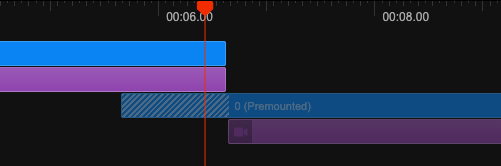
预装的 <Sequence> 确实包含样式 opacity: 0 和 pointer-events: none。
🌐 A premounted <Sequence> does carry the styles opacity: 0 and pointer-events: none.
无法使用 layout="none" 预装 <Sequence>,因为这样的序列没有容器可以应用样式。
🌐 It is not possible to premount a <Sequence> with layout="none" because such a sequence does not have a container to apply the styles to.
使用 <Series> 和 <TransitionSeries>
🌐 With <Series> and <TransitionSeries>
premountFor 也可以在 <Series.Sequence> 和 <TransitionSeries.Sequence> 上使用。
目前还不能预先挂载整个 <Series> 或 <TransitionSeries>。
自定义预装组件
🌐 Custom premount component
预挂载也可以通过公共 Remotion API 自行实现。
像使用 <Sequence> 一样使用以下组件:
🌐 Premounting can also be implemented yourself with the public Remotion APIs.
Use the following component like you would <Sequence>:
PremountedSequence.tsximportReact , {forwardRef ,useMemo } from 'react'; import {Freeze ,Sequence ,SequenceProps ,useCurrentFrame ,useRemotionEnvironment } from 'remotion'; export typePremountedSequenceProps =SequenceProps & {premountFor : number; }; constPremountedSequenceRefForwardingFunction :React .ForwardRefRenderFunction <HTMLDivElement , {premountFor : number; } &SequenceProps > = ({premountFor , ...props },ref ) => { constframe =useCurrentFrame (); if (props .layout === 'none') { throw newError ('`<Premount>` does not support layout="none"'); } constenv =useRemotionEnvironment (); const {style :passedStyle ,from = 0, ...otherProps } =props ; constactive =frame <from &&frame >=from -premountFor && !env .isRendering ; conststyle :React .CSSProperties =useMemo (() => { return { ...passedStyle ,opacity :active ? 0 : 1, // @ts-ignore Only in the docs - it will not give a type error in a Remotion projectpointerEvents :active ? 'none' : (passedStyle ?.pointerEvents ?? 'auto'), }; }, [active ,passedStyle ]); return ( <Freeze frame ={from }active ={active }> <Sequence ref ={ref }name ={`<PremountedSequence premountFor={${premountFor }}>`}from ={from }style ={style } {...otherProps } /> </Freeze > ); }; export constPremountedSequence =forwardRef (PremountedSequenceRefForwardingFunction );
这个自定义组件的一个警告:在预装载的序列中,原生缓冲状态仍然可能被触发。
当处于预装载序列时,你的任务是禁用触发原生缓冲状态(例如将 pauseWhenBuffering 设置为 false)。
例如,你可以通过使用 React 上下文来实现这一点。
与缓冲区状态一起使用
🌐 Usage together with the buffer state
如果你也使用 缓冲状态,<Html5Audio>、<Html5Video>、<OffthreadVideo> 和 <Img> 标签会知道预挂载,并且在预挂载的 <Sequence> 中不会触发缓冲状态。
🌐 If you also use the buffer state, the <Html5Audio>, <Html5Video>, <OffthreadVideo> and <Img> tags are aware of premounting and don't trigger the buffer state while in a premounted <Sequence>.
否则这会导致在场景尚未可见时就暂停播放。
🌐 Otherwise it would lead to pausing playback while a scene is not even visible yet.
另请参阅
🌐 See also